

WBC Game Assistant
An interactive Streamlit app, aimed as a helper tool for playing a computer game.
Technologies Used
Context
When I briefly returned to play my childhood’s favorite computer game, Warlords Battlecry, I realized the game is actually pretty complicated.
Many races, many units with different abilities, types of damage and resistance, it’s just hard to grasp it all. And when you play in a multiplayer mode, with other people, it is reasonable to try to at least not be very terrible at playing the game, so your teammates cannot blame you all the time if the enemy team wins.
Solution
So I’ve decided to help myself (and other players as well).
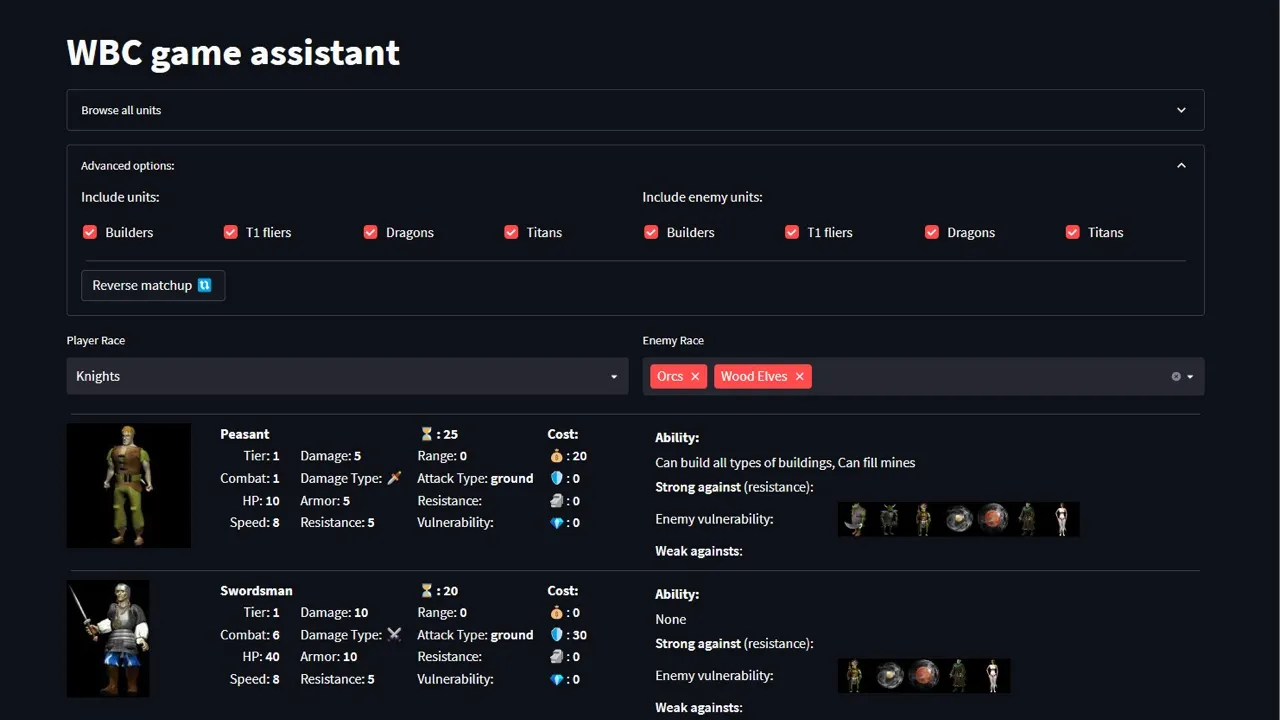
I built an interactive app, which in a highly visual way helps you pick up a strategy for the game.
Core Features
- In the game you can play one of 16 races, so in the app you select your race and up to 5 enemy races
- Each race produce many different units, and these units are then displayed in the app with their images and statistics
- Unit matchups - every unit deals a specific damage type, and each unit has resistances and vulnerabilities. The core functionality is showing which units counter which, helping you forge a winning strategy.
Technical Implementation
- Pandas for wrangling data
- Streamlit for the main layout
- Extra HTML, embedded in Streamlit, to create visually appealing unit cards (and circumvent some of the Streamlit limitations on nested columns)
Reception
I have shared the app with one of the active communities on Discord, and it got some positive feedback, with users claiming that the app is indeed useful (but as far as I’m aware it was not permanently adopted, as the community is rather small and very devoted, playing the game for many years, and knowing all the intricacies inside and out without any extra tools 😅).
Real-world Application
So what we basically do in this app is:
- We take source tabular data, load it in pandas, and there we perform standard data manipulation operations like filtering or sorting
- Then we display this data in a Streamlit app, where we use simple interface elements like checkboxes or filters
- And we want the app to look not so bad either, so we use some images and emoticons as well, trying to end up with reasonably pleasant layout, while at the same time acknowledging Streamlit limitations
So combining this with a rapid development, we get a pretty standard use case for a Streamlit app. Only in this case our data comes from a computer game, but we swap with any business data and we’re still ending up with a similar app, using exactly the same techniques and principles.
Professional Takeaways
- This project has helped me strengthen my Pandas and Streamlit skills, so that I can not only create functional apps, but at the same time make them visually appealing
- Doing this project was also pivotal for me in defining my internal tech stack, particularly to understand when Streamlit is a good fit. Personally I find this almost a textbook example of the framework utilization:
- The app is rather simple, but focused on data - so we’re playing with the library’s strength
- We sprinkle a little bit of custom HTML code to make the app visually appealing, but we’re not fighting against the framework - it’s not an attempt to do more than it’s capable of, but rather a reasonable extension
- We do not need much session state, and retaining the app state is usually the biggest pain in Streamlit - so here we need only a little bit, which is not that hard to grasp
- The result: fully functional, visually pleasant, but not too convoluted in terms of the code and its logic - a perfect fit altogether