

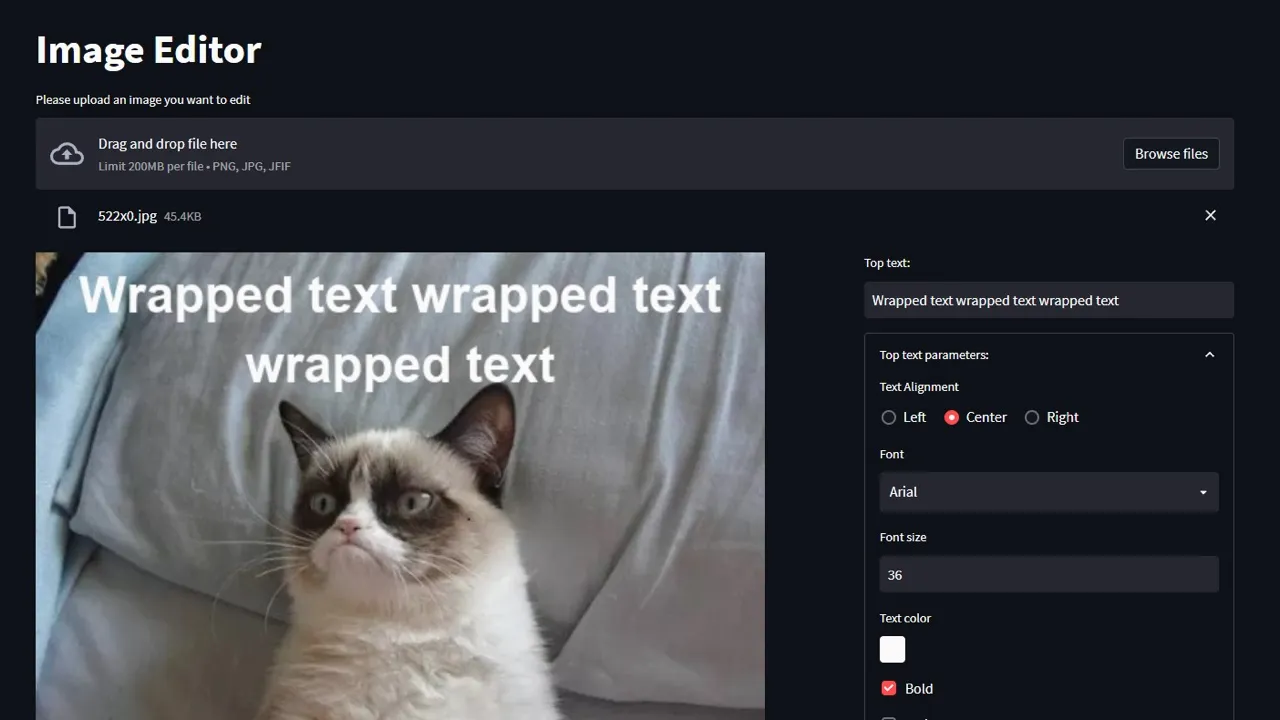
Streamlit Image Editor
A browser-based meme generator built with Streamlit and Pillow, featuring typography controls, real-time preview, and smart text positioning. Organically gained 3 GitHub stars without any marketing.
Technologies Used
Context
I was making memes (as one does) and got slightly annoyed with the tools I was using. Since I was already a Streamlit fan at that point, I thought — why not just build a simple meme generator myself?
It’s the classic “top text, bottom text” format. Nothing fancy, but surprisingly useful when you want quick control over typography.
Solution
I built a browser-based image editor focused specifically on the meme format.
What It Does
- Upload any image and add text overlays (top and bottom, independently configured)
- Typography controls — font selection (including Comic Sans, of course), size, color, bold/italic, alignment
- Real-time preview — changes appear immediately as you type or adjust settings
- Smart text wrapping — automatically wraps long text based on image dimensions
- One-click export — download your creation as PNG
The Technical Bits
-
The interesting part was handling text positioning dynamically — the bottom text needs to adjust its position based on how many lines it wraps to, and the line length depends on both the image width and font size.
-
Streamlit interface elements usually don’t require much abstraction, but here OOP made sense: top and bottom text share the exact same configuration and UI controls, so a single class encapsulates the rendering logic for both, avoiding code duplication.
-
I also had to deal with cross-platform font management (different paths on Windows vs macOS).
The Surprising Part
The project got 3 GitHub stars without any marketing whatsoever. No LinkedIn posts, no Reddit sharing, nothing on the Streamlit forums.
How did people find it? Probably through Google searches for “streamlit meme generator” or similar (although when I tried searching myself, my repository never appeared in the results). But it suggests that the project filled a real gap — people were looking for image editing capabilities in Streamlit, and there wasn’t much else out there.
Real-World Application
This is essentially an image processing application with a user interface:
- Taking user input (image + text configuration)
- Processing with Pillow (text rendering, positioning)
- Delivering output (the final image)
The same patterns apply to any tool where users need to manipulate images — watermarking, resizing, format conversion, adding overlays. The Streamlit + Pillow combination works well for quick internal tools. And Streamlit’s auto-reload after every action is actually desirable here, since with image editing you want to see changes immediately.
Professional Takeaways
- Quality work finds its audience — Even without promotion, if you solve a real problem, people will discover it (yes, 3 stars isn’t much, but the project was literally shared nowhere)
- OOP has its place in Streamlit apps as well — The
TextParamsclass made the code much cleaner than having duplicate logic for top and bottom text - Cross-platform considerations matter — Font paths are one of those things that catch you if you don’t think about them upfront